Sweet Alive Font for Web Design
Testing Sweet Alive in a hero section of a boutique online store was the first step. The font’s whimsical, clean, and slightly quirky style immediately caught my eye. It felt like a breath of fresh air in a digital space that often leans toward more rigid, corporate typography.
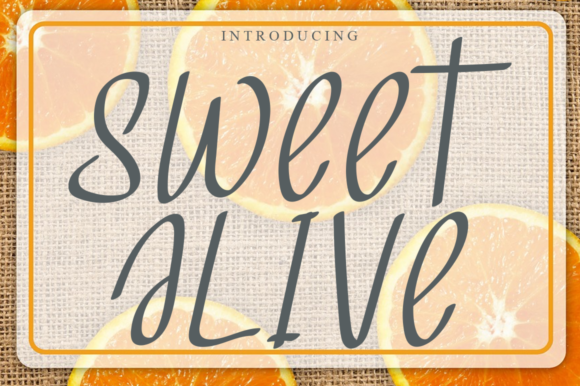
As a web designer, I always start by considering how a font will interact with the rest of the layout. Sweet Alive is a handwritten script font, which means it has a natural flow and personality. Its soft curves and playful strokes make it ideal for headers, logos, and decorative accents rather than long blocks of text.
Visual Characteristics and Digital Appeal
Sweet Alive has a childish charm that feels both modern and nostalgic. It’s not overly ornate, but it carries enough detail to stand out without being overwhelming. This makes it perfect for projects that aim to feel approachable and friendly—like a coaching website or a creative portfolio.
The font’s readability on screen is surprisingly good, especially when used in larger sizes. On mobile devices, it holds up well, though I found that using it for body copy would require careful spacing and contrast adjustments. For headings and short phrases, it shines.
Realistic Use Cases
I’ve used Sweet Alive on a product landing page for a handmade jewelry brand. The font added a personal touch to the headline, making the brand feel more authentic and connected to its audience. It also worked well as a call-to-action button label, where its uniqueness helped the design stand out without clashing with other elements.
Another project involved a blog redesign. I paired Sweet Alive with a simple sans serif font for the body text. The contrast between the two created a balanced visual hierarchy, allowing the headlines to draw attention while keeping the reading experience smooth and professional.
Readability and User Experience
When working with a handwritten font like Sweet Alive, it’s important to consider how users will interact with the content. On small buttons or dark backgrounds, the font can become harder to read if not properly scaled. I made sure to test it across different screen sizes and background colors to ensure it remained legible.
For image overlays, Sweet Alive performed well when placed over light backgrounds. However, on darker images, I had to adjust the font color and add a subtle drop shadow to maintain visibility. These small tweaks made a big difference in the overall user experience.
Font Pairing and Design Strategy
Pairing Sweet Alive with a clean, neutral typeface helps maintain a professional tone while still allowing the font to shine. A serif font could work for editorial-style content, while a sans serif is better for a more modern, minimal look. The key is to use Sweet Alive as a highlight rather than the main text.
For a digital brand kit, I incorporated Sweet Alive into the logo and social media graphics. Its unique character gave the brand a distinct identity without sacrificing clarity. It also worked well in promotional landing pages, where its playful nature matched the energetic tone of the campaign.
Practical Considerations
Before implementing Sweet Alive on a live site, I checked its webfont availability and file formats. The font came with multiple weights and alternates, which allowed for more flexibility in design. It also supported a range of languages, making it a versatile choice for international audiences.
Commercial licensing was another factor. I made sure to review the terms to confirm that it could be used across different platforms and projects without restrictions. This is especially important for designers working on client websites or e-commerce stores.
Overall, Sweet Alive is a great addition to any designer’s toolkit. Its charm and versatility make it suitable for a wide range of digital projects, from online stores to creative portfolios. When used thoughtfully, it can elevate a design and help create a more engaging online experience.